 HeyFini
Your iPhone becomes a baby monitor
An old iPhone by the crib, yours stays with you – that's all it takes. HeyFini turns two iPhones into a fully fledged baby monitor that does more than most devices on the shelf.
In short: A second iPhone or iPad stays with the baby, yours shows live video and sound, with talk-back, night light and lullabies. AI cry detection runs entirely on the device. At home the devices connect directly over Wi-Fi, on the go over mobile data, always end-to-end encrypted. The baby monitor is part of HeyFini Pro.
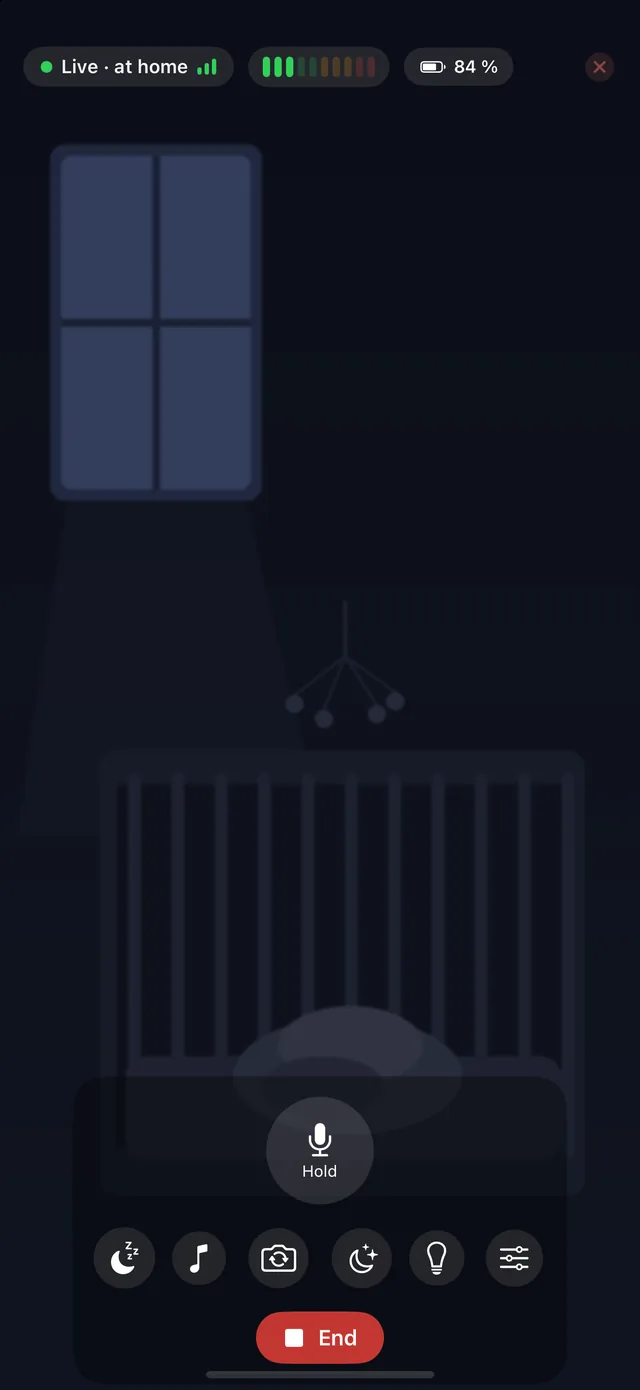
What can the HeyFini baby monitor do?
📹 Live video & audio
From the crib straight to your iPhone – with selectable video quality up to 1080p and a night mode for dark rooms.
🧠 AI cry detection
Our favourite feature: the AI recognises right on the iPhone whether your baby is really crying – or the dog is just barking. Completely local, nothing leaves the device.
🎙️ Two-way talk
Hold to talk – your voice soothes without you having to get up.
🌙 Night light & lullabies
From the parent device: warm night light, white noise, ocean sounds, a heartbeat – or a recording of your own voice.
🔦 Light from the next room
You dim the baby unit’s night light from your own device – soft, medium or bright. And when the room is pitch dark, you can switch on the baby unit’s flashlight, best pointed at a wall or the ceiling. For fine tuning, press and hold the tile and a slider appears.
🔇 Mute for a moment
On the phone, or someone asleep next to you? Then mute the sound on your device. The level meter keeps running and every alarm stays loud – crying, noise and lost connection.
🔋 Battery watchdog
If the baby unit is unplugged or the battery runs low, your iPhone raises the alarm immediately – and on connection loss anyway. A silent line must never feel like a sleeping baby.
🖼️ Picture in the alert
When your baby cries or something moves, HeyFini sends more than an alarm: the current picture from the cot comes with it. On iPhone, iPad and Apple Watch you see what is going on without opening the app.
🪟 Picture in Picture
Leave HeyFini while the parent station is open and the live video keeps running as a small window above your other apps. Tap it to bring it back, the pause button only mutes the sound. Turn it off under Settings → Baby monitor.
⌚ Tile on the Apple Watch
While the parent station is running, the Watch shows connection, noise level and the station’s battery. On crying, noise, movement or a lost connection it vibrates and shows the latest image, even while the app is open on the iPhone.
🔔 The baby station is on
When someone starts the baby station, your iPhone lets you know as soon as the start arrives via iCloud. One tap opens the parent station. Only shows up if you aren’t already watching.
👨👩👧 Watch along without a code
Mom, Dad and the iPad can all watch at the same time. If a third device wants to join, one tap on “Watch the family baby monitor” is enough. The request shows up right above the picture on the other devices and as a notification, with allow and decline. Nobody has to fetch a code any more. Alerts arrive with a camera image on the Apple Watch, too.
📔 Night log
Every sound event lands in the log with a short clip you can listen to – in the morning you know how the night really went.
🔒 No server at home, LTE/5G on the go
On the same Wi-Fi both iPhones connect directly – no server in between. Away from home it runs over cellular or any other network, always end-to-end encrypted.
Why is on-device AI detection such a big deal?
Most smart baby monitors send audio to the cloud to detect crying. HeyFini instead uses Apple's on-device AI sound classification: the audio is analysed on the iPhone and then discarded – no server listens in. You get the targeted alert “Your baby is crying” instead of “sound detected” ten times a night, and your privacy stays fully intact. That fits HeyFini's privacy promise.
Can I use my old iPhone as a baby monitor?
That's exactly what it's built for: the retired iPhone goes on the charger next to the crib and becomes the baby unit – you pick the front or back camera, so the bright screen can double as a soft light, and the screen dims by itself. Your current iPhone is the parent unit. Pairing happens once via QR code or automatically through family sharing.
How much does the baby monitor cost?
Two ways: buy it once for €7.99, no subscription, with Family Sharing and the first 24 hours free. Or as part of HeyFini Pro for €2.99/month or €19.99/year. No extra device. Just download HeyFini and get going.
Frequently asked questions
Do I need new hardware?
No – two iPhones, or an iPhone and an iPad, with HeyFini are enough. A retired iPhone on its charger makes the perfect baby unit.
Is a server listening in?
No. At home on Wi-Fi both devices connect directly and end-to-end encrypted; the AI cry detection runs entirely on the iPhone.
Does it work away from home?
Yes – over cellular, LTE or 5G, or someone else's Wi-Fi too, and the stream stays end-to-end encrypted. At home on your own Wi-Fi everything runs without any server.
What happens if the Wi-Fi drops?
Your iPhone sounds an unmistakable alarm as soon as the connection is lost for longer, and reconnects automatically – a dead line never goes unnoticed.
Does the alert show me what is going on?
Yes. When the baby unit reports crying or movement, HeyFini attaches the current picture from the cot to the alert. It appears on your iPhone, your iPad and, mirrored, on your Apple Watch. The picture stays on your devices, no server ever sees it.
Can a third device watch along?
Yes. Every device in your family can ask with one tap, and the others confirm in a second. Without family sharing it works through a code that the baby unit shows.
Can I control the light in the nursery from another room?
Yes, you can dim the baby unit’s night light, and you can switch on its flashlight on top of that. Point it at a wall or the ceiling, not at your baby.
Does the video keep running when I leave the app?
Yes. If the parent station is open when you leave HeyFini, the live video floats as a small window above your other apps. The sound keeps running anyway, even with the screen locked.